
Robbie
+Supporters
-
Joined
-
Last visited
Subscriber
Subscriber
Everything posted by Robbie
-
Connections Puzzle #937 🟨🟨🟨🟨 🟩🟩🟩🟩 🟪🟦🟪🟪 🟪🟪🟦🟪 🟪🟦🟪🟦 🟪🟪🟪🟪 🟦🟦🟦🟦phew
-
Strands #671 “I've never seen that before!” 💡🔵🟡🔵 🔵🔵🔵
-
#waffle1443 5/5 🟩🟩🟩🟩🟩 🟩⭐🟩⭐🟩 🟩🟩⭐🟩🟩 🟩⭐🟩⭐🟩 🟩🟩🟩🟩🟩 🔥 streak: 110 🌟 #wafflecenturion wafflegame.net
-
Wordle 1,659 4/6 🟨⬜🟨⬜⬜ ⬜🟨🟨🟨⬜ 🟩🟩⬜⬜🟨 🟩🟩🟩🟩🟩
-
Just a quiet day in for us after the festivities. It's all over bar the shouting for another year. Xmas comes and goes so quickly doesn't it.
-
Gillingham are going to employ similar tactics to Altrincham when Notts play them at ML on Sunday, but they will be better than Altrincham on paper. Notts will need to break them down & it will be tough to do. I will be surprised if we see an unchanged Notts team for this match. Notts need to have players that can show moments of brilliance in the starting eleven. I think Jodi Jones has to start whether it be on the wing or as a number ten. I would replace Macari with Ness at the back. I would also put Jatta on the bench with Dennis leading the line. I would also consider Hinchy partnering Norburn in CM with Iorpenda just behind Dennis. Hopefully Palmer is close to being ready to start so having him back would be a big boost. I think everyone is waiting for players to come in to strengthen the squad & we all know the positions that need strengthening. The quicker we see movement into the Club the better.
-
Some may not agree, but I don't want to see young loanee players being recruited during the January transfer window. Notts need seasoned experienced professionals who are going to strengthen the squad & hopefully help get Notts promoted. The summer transfer window is the ideal time to recruit players that can be developed into valuable assets along with talented young players from Premier League sides who can serve q good purpose. I don't think the January transfer window is the right time for these type of signings.
-
I think it's probably a further sign that the Club are happy with the players who form our defence. I think Aljofree will be more suited to a National League side to get game time experience.
-
An important topic to discuss @theAnticlough & an interesting introduction. I don't think there is much wrong with the defence & Notts do have cover if required. I do think that the goalkeeper position requires attention though. Although Iorpenda & Norburn have done a reasonable job, Notts do miss Palmer & Robertson because they bring a little extra going forward by initiating attacks much better. Notts have to do something about the AM position. They need to recruit but they have to recruit quality, & will have to pay for that quality. The only alternative is trying Iorpenda further forward, or giving Jodi another go. I do think that Grant does a reasonable job that largely goes unnoticed, but he needs a good partner next to him. After giving Jatta & Dennis a spell together, I don't think it is working as well as just having either Jatta or Dennis playing upfront on their own with support just behind. A tall strong attacker that can shield and distribute the ball would be a good option to recruit. And the elephant in the room. The tactical battle. Notts are losing it especially at home. We are simply missing quality to unlock stubborn defensive tactics. The powers that be at Notts have to address this as a matter of urgency. It has gone on for too long.
-
Notts seem to lose the tactical battle against opponents at Meadow Lane more often than not. Opponents just sit back and allow Notts possession & just challenge Notts to break them down. They then bide their time to either take advantage of a Notts mistake at the back, or hit Notts on the break when they can. These opponents also tend to bully Notts with their physicality, they also employ the dark arts, by slowing the game down, fouling by pushing, pulling & time wasting. Since Notts were promoted this problem has remained a big factor with Williams, Maynard & now Paterson unable to solve it. Paterson still has an opportunity, but I think the problem will persist unless Notts can recruit strong & skillful players who will have the skill to unlock these opponents defensive tactics.
-
Strands #670 “Home is where the hearth is” 🔵🔵🔵🔵 🟡🔵🔵
-
Connections Puzzle #936 🟨🟨🟨🟨 🟩🟩🟦🟩 🟩🟩🟩🟩 🟪🟦🟪🟦 🟦🟦🟦🟦 🟪🟪🟪🟪
-
#waffle1442 4/5 🟩🟩🟩🟩🟩 🟩⭐🟩⭐🟩 🟩🟩🟩🟩🟩 🟩⭐🟩⭐🟩 🟩🟩🟩🟩🟩 🔥 streak: 109 🌟 #wafflecenturion wafflegame.net
-
Wordle 1,658 5/6 ⬜⬜⬜⬜⬜ ⬜⬜🟩⬜⬜ ⬜🟩🟩🟩⬜ ⬜🟩🟩🟩🟨 🟩🟩🟩🟩🟩
-
On New Year's Day, Stuart Maynard's York City currently stand in 2nd place in the National League, They have only lost two of their 24 matches so far with 15 wins. They have scored 63 goals & conceded only 26. It's nice to see Stuart doing well.
-
A big welcome from me @Ros & welcome to our friendly community.
-
A very dissapointing defeat against a side that Notts have had a good recent record against since returning to League 2. So did any Notts player stand out for you today? I have picked the starting eleven for you to choose your PON Man of the match. Those players are, Roos, Macari, Platt, Bedeau, Tsaroulla, Norburn, Iorpenda, Kouhyar, Hall, Dennis, Jatta.
-
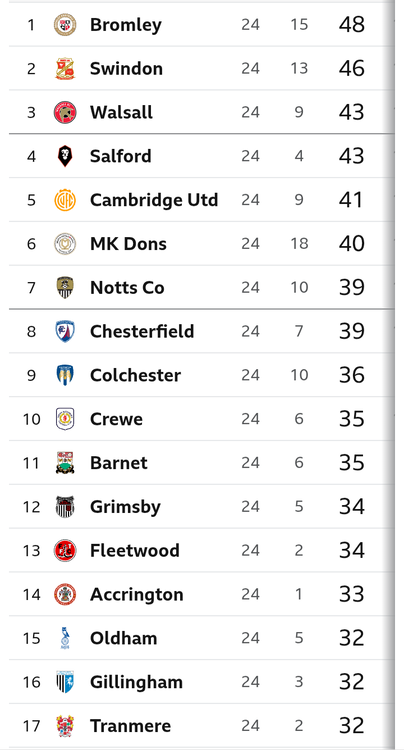
League 2 Table after today's matches. Notts down to seventh.
-
Sorry guys, I got my predictive score very wrong. The less said about that performance the better. Big test for Paterson now to see what he is really made of under pressure as Notts slide down the Table..
-
FULL TIME Defeat at homeNotts 0 Accrington 1
-
Update (87) Ness is on for Macari Notts 0 Accrington 1
-
Update.(72) Goal to Accrington Notts 0 Accrington 1
-
Update (69) Grant delivers a dangerous cross for the unmarked Dennis - but he can't keep his diving header down.(71) Bennetts and Gordon replace Hall and Tsaroulla.Notts 0 Accrington 0
-
Update.(56) Kouhyar and Jatta make way for Jones and Grant. ️Notts 0 Accrington 0
-
(46) Back to it. No changes.Notts 0 Accrington 0